At Team '26 California, Atlassian continued to make one message clear: AI is not only changing how individuals work. It is changing how entire organizations operate.
In the session "Teamwork Collection keynote: Power the era of human-AI collaboration," Sanchan Saxena and Andrew Stillman introduced how Atlassian Teamwork Collection - including Jira, Confluence, Loom, and Rovo - is becoming a foundation for organizations to bring AI into everyday work.
What stood out in this keynote was not simply a list of new AI features. More importantly, Atlassian showed how AI should work inside an organization: not as a separate tool outside the workflow, but as part of the system where work, knowledge, decisions, people, and processes already live.
In other words, AI only becomes truly valuable when it understands the organization's context.
From task management to human-AI collaboration
For more than 20 years, Jira has been the place where software teams manage work from "to-do" to "done." But in the AI era, Jira's role is expanding beyond task tracking.
According to Atlassian, Jira is becoming the launchpad for human-AI collaboration - a place where people and AI agents can work together inside existing workflows.
The key difference is that AI does not operate outside the system. Agents can be embedded directly into a company's workflows. When a work item moves into a specific status, the right agent can pick it up, start working, ask a human for input when needed, and update the result directly in Jira.
This turns Jira into an orchestration layer between humans and AI. Teams do not only know where a task is. They can also see which agent is working on it, what feedback has been incorporated, who made which decision, and where human judgment is still needed.
This matters for enterprises. As AI becomes more deeply involved in operations, organizations need visibility, traceability, and governance. If AI works only in isolated chats or personal tools, it becomes difficult to know what actually happened. But when AI works inside a system of record like Jira, every interaction becomes part of the work history.
Loom Agent Briefings: Turning ideas into context-rich work items
One of the most notable demos in the session was Agent Briefings in Loom.
Traditionally, creating a good ticket for a team or an AI agent takes effort. Users need to write descriptions, add links, attach files, explain context, clarify requirements, and often repeat what has already been discussed in meetings. This takes time, and it is one reason many ideas remain stuck in people's heads instead of becoming actionable work.
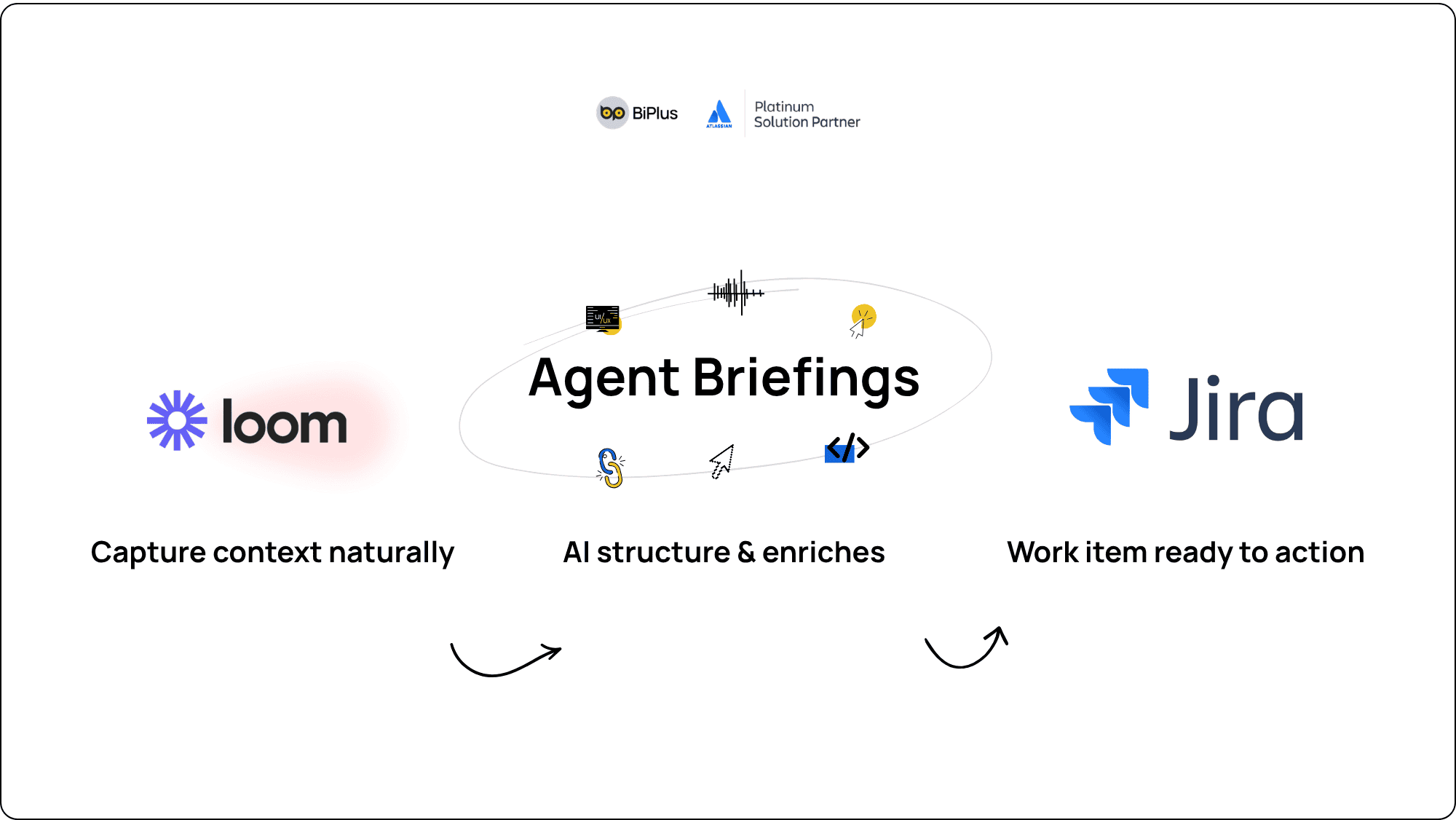
With Agent Briefings, users can simply record a Loom as if they were briefing a teammate. They can speak naturally, open Jira Product Discovery, point to a Figma file, click through parts of the interface, explain what needs to change, and reference links or attachments.
Loom does not only capture voice and screen. It also captures clicks, links, code, UI elements, and the surrounding context. From there, Loom creates an action plan and recommends Jira work items for the user to review.
With one simple "show and tell," work can be moved into Jira with enough context for a human or AI agent to begin.
This reflects a very practical direction from Atlassian. Instead of forcing people to become expert prompt writers, the system helps turn natural workplace communication into context that AI can use.
Work items become context-rich prompts for AI agents
A core idea from the keynote is that a Jira work item can become a context-rich prompt.
In many cases, AI produces poor results not because the model is not intelligent enough, but because it lacks context. A short prompt without goals, dependencies, related documents, previous decisions, or ownership often leads to output that does not fit the real situation.
Atlassian is addressing this by making each Jira work item a rich package of context. A work item is no longer just a title and description. It can include Figma links, Confluence documents, meeting notes, related decisions, attachments, conversation history, and data from the Teamwork Graph.
When an agent receives work from Jira, it does not begin with a disconnected instruction. It begins with the full context of the task.
This is why Atlassian emphasized the role of the Teamwork Graph. The Teamwork Graph is the data layer that connects work, documents, people, goals, decisions, and interactions across the organization. It helps AI understand what is happening, instead of simply responding to a short prompt.
For enterprises, this is a major difference. AI does not only need to be smarter. It needs to understand the organization better.
Agents in Jira: From using AI to orchestrating AI
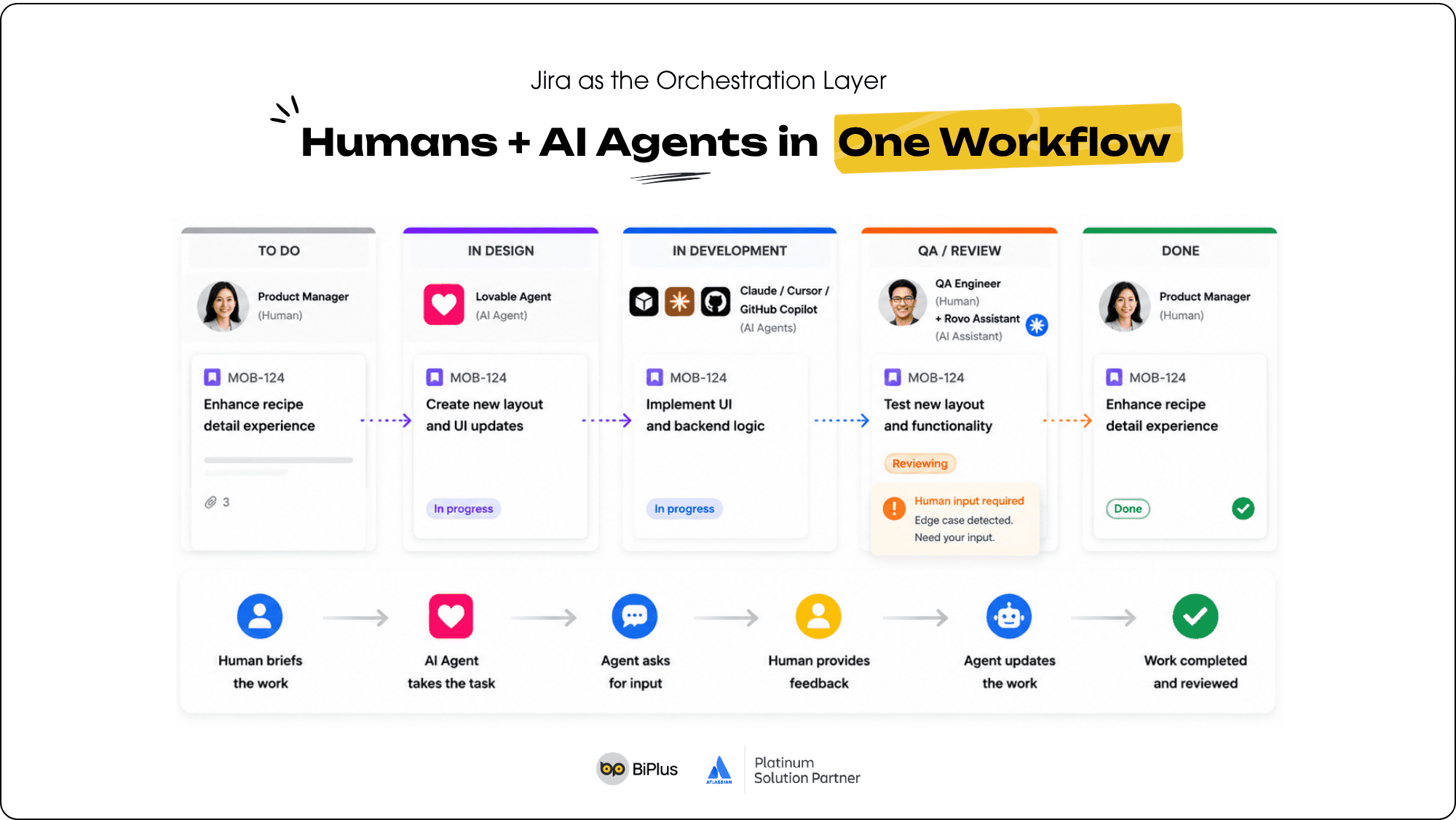
Atlassian also announced the ability to use agents in Jira, including Rovo agents, custom agents created by teams, and third-party agents from tools such as Cursor, GitHub Copilot, Figma, HubSpot, Lovable, and Claude.
In the demo, a work item created from a Loom briefing could be moved into the design phase. Immediately, a design agent such as Lovable picked it up and started creating a prototype. When it needed input, the agent asked the user. The user selected an option, gave more feedback, and the agent continued updating the design.
The important point is that all of this happened inside Jira.
Users do not need to jump across tools to understand what the agent is doing. Teams do not need to ask, "Who changed this?", "Why was this decision made?", or "Which feedback was applied?" Everything is captured inside the work item.
This approach allows organizations to adopt AI without breaking their current workflows. Instead of creating an entirely new process for AI, companies can embed agents into the workflows they already use.
This is especially relevant for large organizations. In enterprise environments, the challenge is not only whether teams can use AI. The bigger question is whether they can use AI in a way that is visible, governed, and scalable.
Developers need AI, but software development is still a team sport
A major part of the keynote focused on the developer experience.
Atlassian acknowledged that AI is rapidly changing how developers write code. Developers can use AI to generate code faster, but building high-quality software is still not a solo activity.
Code may be produced faster. But understanding the right requirements, planning the technical approach, breaking work down, collaborating with the team, reviewing, testing, and making sure the product matches business goals are still team-based activities.
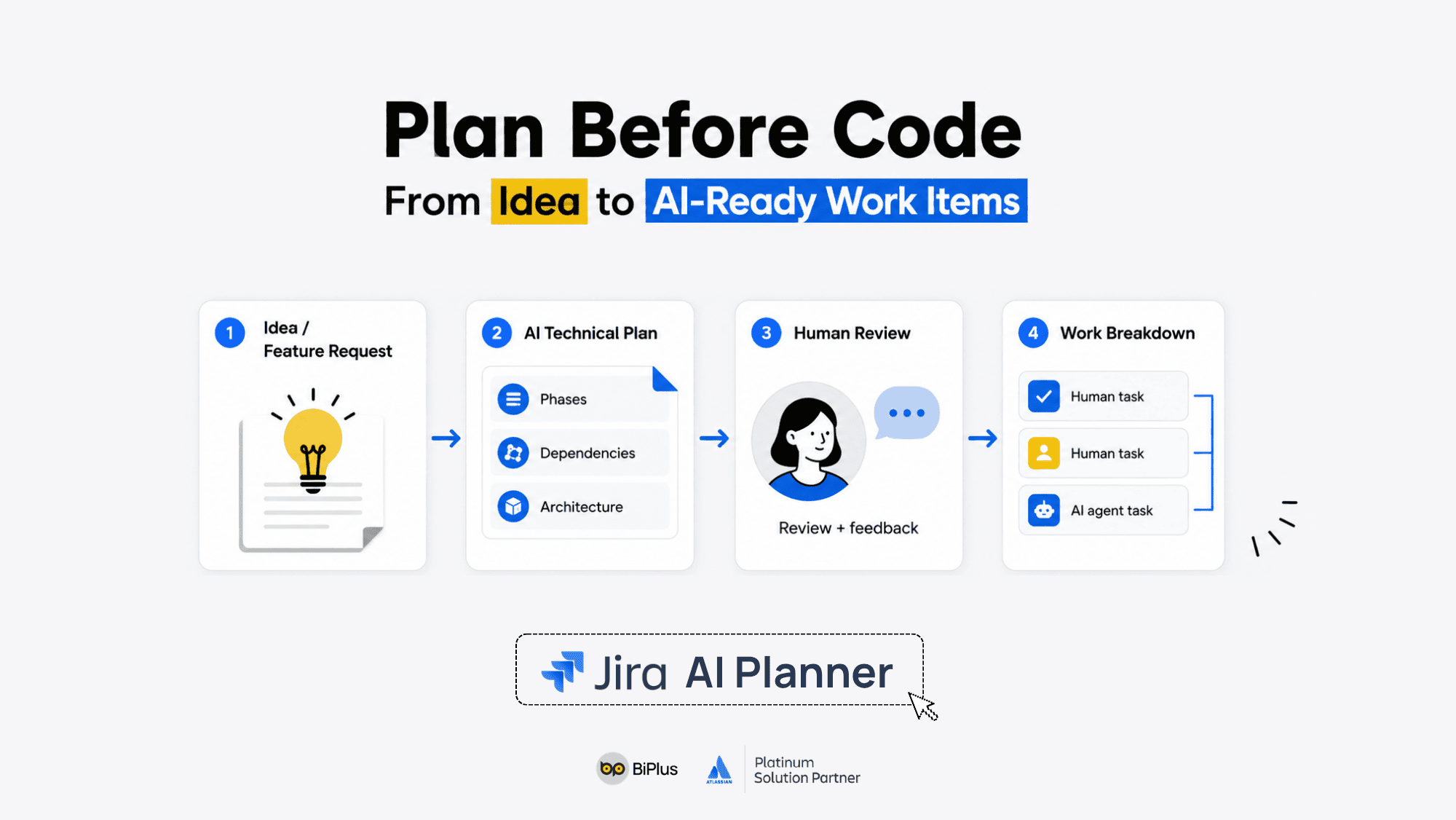
That is why Atlassian introduced Jira AI Planner.
With Jira AI Planner, a developer can start from a feature request or product idea. AI Planner creates a detailed technical plan, including implementation phases, dependencies, architectural considerations, and execution steps. Team members can then review, comment, and edit the plan directly in Jira.
Once feedback has been incorporated, AI Planner can update the plan and break it down into smaller work items. The system can also recommend which tasks should go to humans and which can be assigned to agents such as Cursor, Claude, GitHub Copilot, or Rovo Dev.
The message is clear: AI can accelerate output, but Jira helps teams make sure that output is going in the right direction.
In the AI era, the bottleneck in software development may no longer be the speed of writing code. The new bottleneck is the ability to plan well, provide enough context, orchestrate work effectively, and review outcomes across both humans and AI agents.
Rovo brings human-AI collaboration beyond engineering
Another important point from the keynote is that Teamwork Collection is not only for software teams. Atlassian also showed how AI can support business teams such as marketing, HR, sales, and operations.
In one demo, a marketing lead had just returned from vacation and needed to quickly understand the latest status of a launch campaign before meeting with their manager. Instead of reading through messages, Jira tickets, Confluence pages, and meeting notes, the user simply asked Rovo: "What changed last week?"
Rovo gathered information from Jira milestones, Confluence plans, meeting decisions, Microsoft Teams chats, and other sources connected through the Teamwork Graph. It did not just list information. It highlighted what mattered: which feature had moved out of scope, what the main risk was, when the decision was made, and who was involved.
The user could then ask what would happen if the campaign switched to a different hero feature. Rovo analyzed the ripple effects across related workstreams and produced a practical view the team could act on.
This is a strong example of context-aware AI. AI is not just answering a generic question. It is reading real work data, understanding relationships across workstreams, and helping people make decisions faster.
Slides in Confluence: Turning work context into presentation-ready assets
Another notable announcement was Rovo's ability to create slide decks in Confluence.
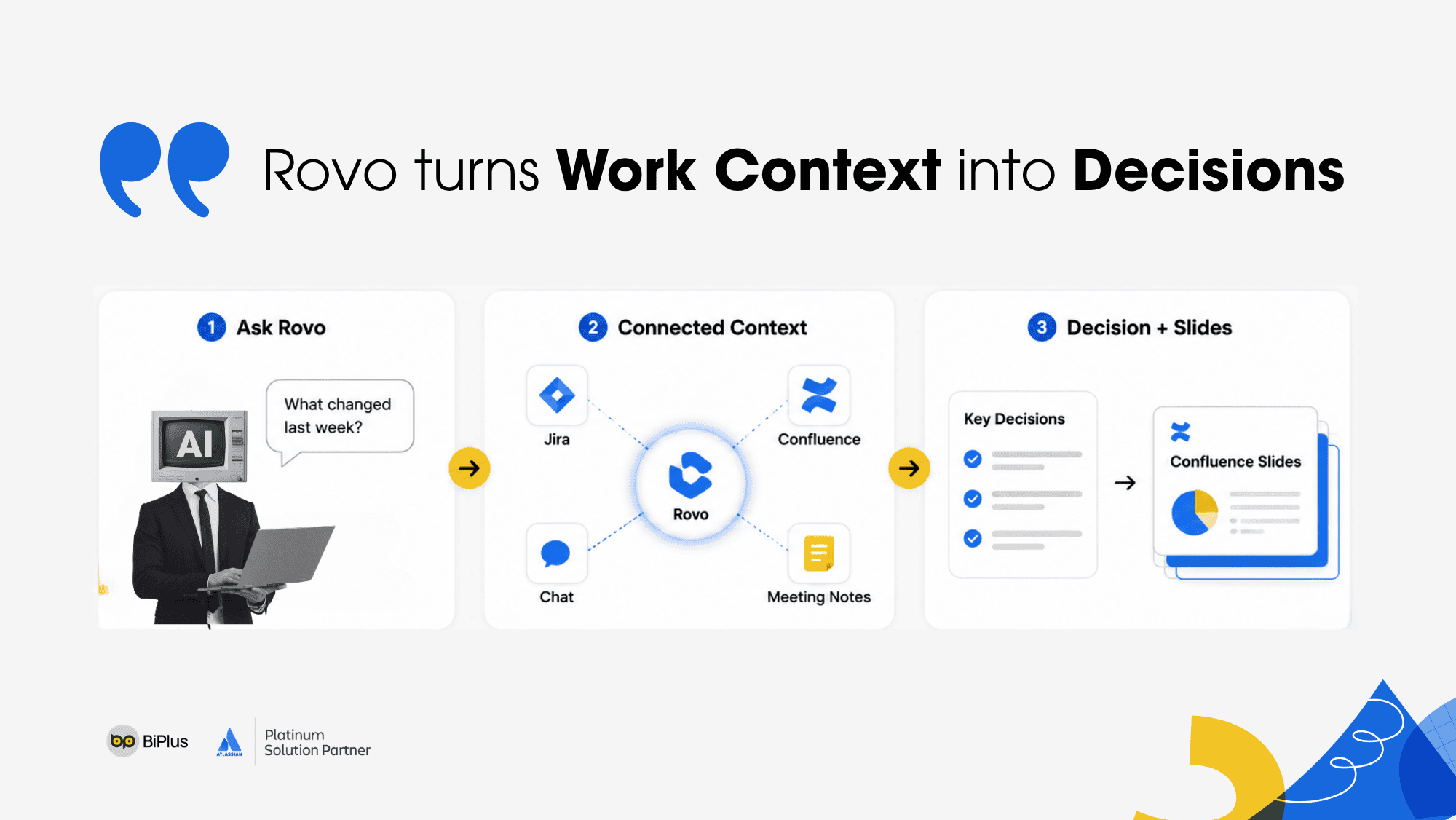
Based on the data already gathered and analyzed, Rovo can generate a presentation-ready deck. The slides have structure, include charts where relevant, reflect the work context, and follow the company's brand guidelines.
Importantly, these are not static images. Users can edit the slides directly or ask Rovo to continue refining them.
This shows how Atlassian is expanding the role of Confluence. Confluence is no longer only a place to store knowledge and documentation. It is becoming a workspace where teams can create new work assets - from plans and analysis to reports and presentations - based on real organizational context.
For business teams, this is highly practical. A significant amount of time in organizations is not spent only on doing the work, but also on collecting information, rewriting it, presenting it, and moving it from one format to another. If AI can handle part of that process using trusted work data, team productivity can improve significantly.
>> Learn more about how Remix in Rovo creates visual documents in Confluence
Mercedes-Benz and Williams F1: Context as an operating capability
The keynote also included examples from large organizations such as Mercedes-Benz and Williams F1.
Mercedes-Benz was presented as a company undergoing a major transformation to become a technology and software-driven organization, especially in the context of software-defined vehicles. At enterprise scale, a strong collaboration system is essential for managing work, sharing knowledge, and making information accessible quickly.
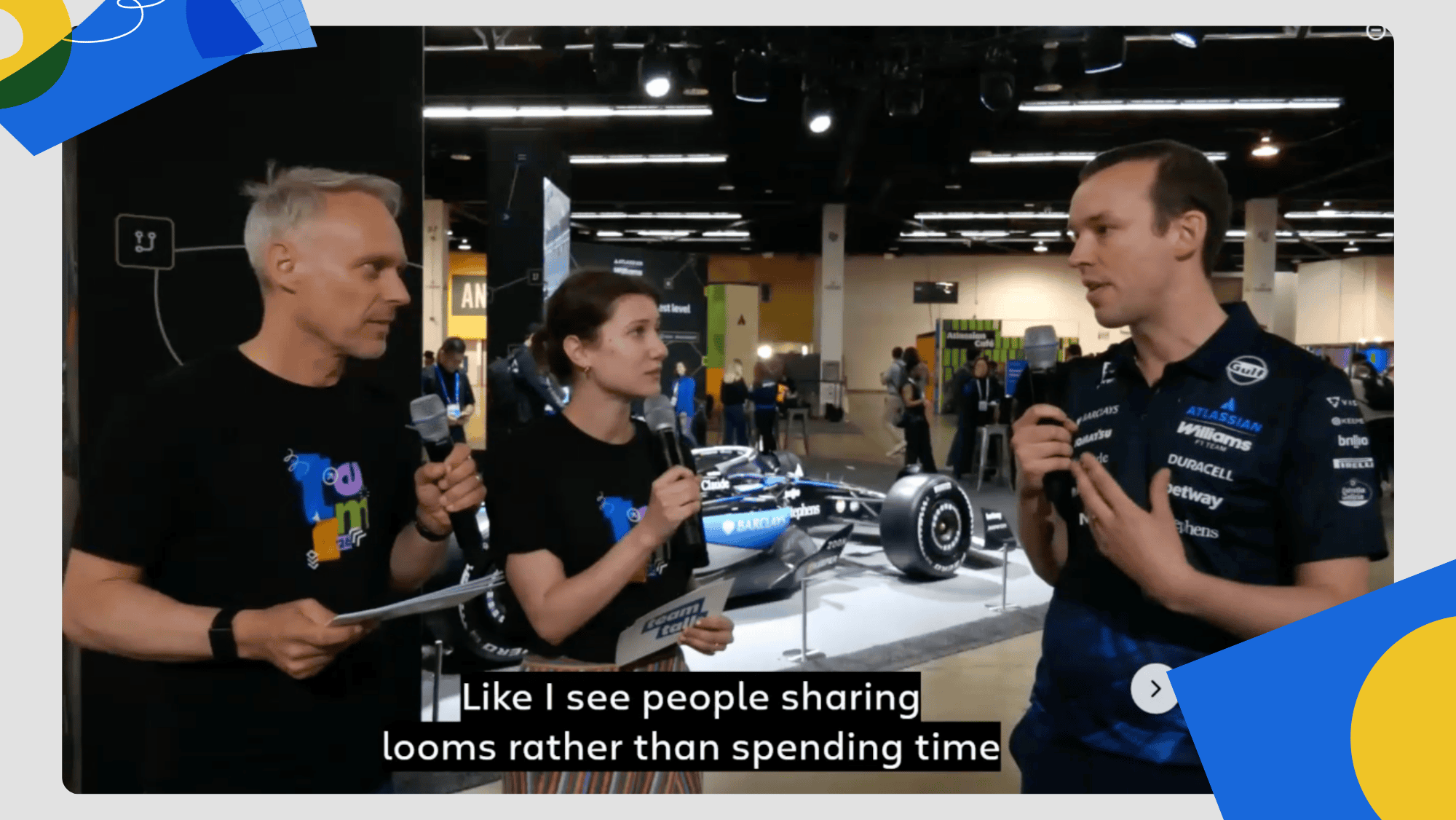
Williams F1 was another compelling example. In Formula 1, every small detail can make a difference on race day. A Williams representative shared how Jira, Confluence, Loom, and Assets helped the team work more effectively, reduce reliance on status meetings, improve documentation, and make information easier to find.
The broader lesson is clear: context is not simply data stored in a system. Context is an operating capability.
When information is fragmented, teams need to ask more questions, schedule more meetings, search across more tools, and spend more time trying to understand what is happening. When context is well connected, teams can make decisions faster, coordinate more precisely, and reduce friction in daily operations.
What this means for organizations: AI-native starts with the system of work
The keynote from Sanchan Saxena and Andrew Stillman reinforced one of Atlassian's central messages at Team '26: in the AI era, competitive advantage does not come from which model a company uses. It comes from whether the company has enough context for AI to create real value.
If AI does not know what the company is prioritizing, which team owns which work, what decisions have been made, which documents are current, where dependencies exist, and how workflows actually operate, its output will remain fragmented.
But when AI is connected to the system of work, it can become part of how the organization operates. AI can pick up work, handle tasks, ask for input, update status, summarize risks, create plans, support decision-making, and present results.
This is the difference between "using AI" and operating in an AI-native way.
An AI-native organization does not simply buy more AI tools. It builds a work system where people, data, workflows, and AI agents are connected.
Conclusion: Teamwork Collection as the new collaboration infrastructure for AI-native enterprises
Through this keynote, Atlassian is positioning Teamwork Collection as more than a set of collaboration tools. Teamwork Collection is becoming a new collaboration infrastructure where work, knowledge, decisions, and AI operate in one connected system.
- Jira orchestrates work between people and agents.
- Confluence becomes the space for knowledge and work asset creation.
- Loom turns natural communication into actionable briefings.
- Rovo connects context, analyzes information, and helps teams make better decisions faster.
- Teamwork Graph provides the data foundation that helps AI understand how the organization works.
For enterprises, the key question is not simply "Which AI tool should we use next?" A better question is: "Do we have a strong enough system of work for AI to understand, participate, and create real value?"
In the era of human-AI collaboration, AI cannot reach its full potential without context. And context does not appear by itself. It is built through the way organizations manage work, document knowledge, connect data, and run workflows every day.
That is why Teamwork Collection is becoming an important part of Atlassian's vision: helping organizations not only work faster with AI, but work smarter, with greater visibility, control, and scalability in the AI-native era.
>> Explore more topics from Atlassian Team '26 California